M = coo_array(
    (np.random.randn(5), ([0, 0, 1, 2, 4], [1, 3, 0, 1, 3])),
    shape=(5, 4)
)
M
<COOrdinate sparse array of dtype 'float64'
with 5 stored elements and shape (5, 4)>How to store and work with sparse matrices, where zero values are not stored.
Many problems take the form of sparse matrices: matrices in which most of the values are 0. When a matrix is sufficiently sparse, we may wish save memory by storing only the nonzero values. SciPy, PyTorch1, and other libraries provide support for building, converting, and computing with sparse matrices.
1 PyTorch’s sparse matrix support is still incomplete in some places, and does not have wide support on compute backends other than CPU an CUDA, but it works for many basic operations.
A sparse matrix has a shape, just like a normal (dense) matrix: so long as we’re working with 2D matrices and not tensors, this is the number of rows \(m\) and number of columns \(n\): the matrix shape is \(m \times n\). In Python, the shape is usually represented as a tuple (m, n).
Following the standard mathematical convention for matrix entries, for a matrix \(A \in R^{m \times n}\), we will denote individual values \(a_{ij}\) (the value at row \(i\) and column \(j\)). By convention, the first size or first index is the row, and the second is the column. I will use 0-based indexing throughout this tutorial, because it is the common pattern for Python, C, Rust, and similar languages. Pure mathematical treatments, R, MATLAB, and FORTRAN typically start counting rows from 1.
The matrix also has the number of nonzero entries (abbreviated NNZ), often stored as an attribute nnz. In this tutorial, I will use the variable \(N\) to denote NNZ.
We can also talk about the sparsity or density of a matrix. The density of a matrix is the fraction of values that are nonzero: \(\frac{N}{mn}\).
There are several different layouts for storing sparse matrices. In this tutorial, we’ll talk primarily about three that are widely-supported and relatively easy to work with directly when necessary:
You may see other formats, such as the various block sparse formats, from time to time. These can be more efficient for some computations, but libraries supporting them usually also provide functions to convert to and from the formats above, which are easier to directly manipulate. For example, if Block Sparse Row (BSR) is the best format for the computations you need, it’s usually easiest to set up your matrix by constructing it in COO format and then converting to BSR.
What these formats have in common is that they some way of storing two things:
As a special case, some sparse matrices will only store the locations. This is most common for matrices where all values are either 0 or 1.
Coordinate layout directly stores the nonzero values along with their locations (coordinates) in three parallel arrays, each of length \(N\). You can think of these as a data frame with three columns: row, column, and value.
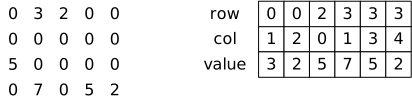
These arrays or columns do exactly what they say on the tin: they indicate the row number, column number, and value of each nonzero entry in the matrix. In some cases, some of the stored values may also be zero; this is not an error, and they can be trimmed away as a separate matrix clean-up operation.
In Python, including PyTorch, and other environments with 0-based array indexing, the row and column numbers are usually 0-based (the first row or column has number 0). In R, MATLAB, FORTRAN, and other environments with 1-based array indexing, they will typically start from 1. If you are working in a multilingual codebase and constructing or manipulating sparse matrix representations yourself, you need to make sure you know which index base is needed for a particular library or routine, and in some cases may need to convert between index bases (by adding or subtracting 1).
Compressed sparse row (CSR) matrices store the matrix values row-by-row, compressing each row by removing the nonzero entries.
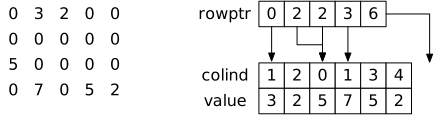
Like COO matrices, CSR matrices have three arrays, but they have different sizes and meanings:
value has size \(N\) and contains the nonzero values, like in COO.colind has size \(N\) and contains the column numbers corresponding to these nonzero values, like in COO, except they are required to be grouped and ordered by row (all nonzero values of the first row, followed by the nonzero values of the second row).rowptr and has size \(m+1\). Rather than storing the row number of each value, we instead store a pointer (index) into the other arrays where the values for that row start. The first nonzero value (an column number) for row \(i\) is stored at position rowptr[i] in the other two arrays, and the last nonzero value is stored at position rowptr[i+1]. If rowptr[i] == rowptr[i+1], then the row has no nonzero values. The last entry of rowptr, rowptr[m], stores \(N\), so that we can conveniently access rows without needing to special-case finding the end of the last row’s storage.There are a couple of variations of CSR layout. Some systems make rowptr have length \(m\), so you need to consult the lengths of the other arrays or a separate nnz value to correctly access the last row’s values. Other systems (like Intel’s MKL) have separate row-start and row-end arrays, which allows the actual matrix data to be noncontiguous.
Compressed sparse column (CSC) layout works exactly like CSR, except it has row index and column pointer arrays, instead of column index and row pointer. A CSR matrix is the CSC representation of its transpose, and vice versa.
COO layout is the easiest to create from other data: you just need to identify the rows, columns, and values. Therefore, when setting up a sparse matrix, it’s usually easiest in my experience to prepare my data in COO, and then convert to other sparse layouts as needed. SciPy reflects this in its API: all sparse matrix layouts accept COO inputs in their constructors.
CSR or CSC format is usually more efficient for linear algebra and matrix manipulations, and allows us to efficiently locate the data for a particular row (or column, for CSC).
I rarely use BSR or other formats.
SciPy provides sparse matrix support through the csr_array, coo_array, and related classes in the scipy.sparse module.
SciPy also provides csr_matrix, coo_matrix, etc. classes, but these are older legacy classes. New code should use the _array classes.
You can create any sparse matrix from COO arrays by providing a nested tuple containing the value array and a tuple of index arrays (v, (r, c)), along with a shape (m, n):
M = coo_array(
(np.random.randn(5), ([0, 0, 1, 2, 4], [1, 3, 0, 1, 3])),
shape=(5, 4)
)
M<COOrdinate sparse array of dtype 'float64'
with 5 stored elements and shape (5, 4)>We can convert this array back to a dense array to see the values:
M.toarray()array([[ 0. , 0.43917736, 0. , -0.47305381],
[ 0.12424068, 0. , 0. , 0. ],
[ 0. , -0.00690387, 0. , 0. ],
[ 0. , 0. , 0. , 0. ],
[ 0. , 0. , 0. , -0.48631936]])The same input works to create CSR or CSC arrays:
csr_array(
    (np.random.randn(5), ([0, 0, 1, 2, 4], [1, 3, 0, 1, 3])),
    shape=(5, 4)
)
<Compressed Sparse Row sparse array of dtype 'float64'
with 5 stored elements and shape (5, 4)>